
Overall Score
25
Top 25%
of AI companies
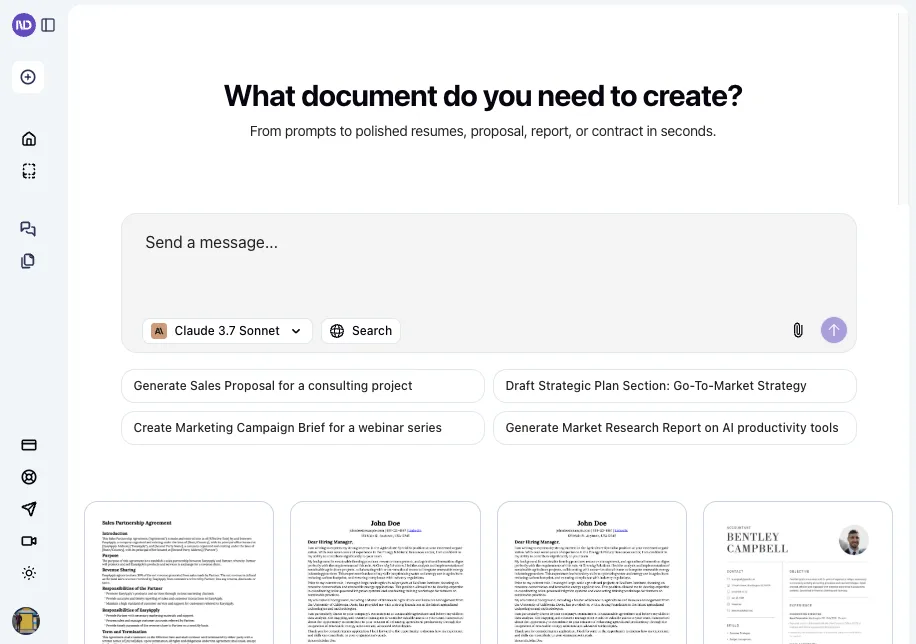
Turn ideas into stunning documents and slides instantly. AI handles structure, formatting, design, and branding, so you don’t have to.
NextDocs is an AI-native editor for creating professional documents and slides fast. Describe what you need and generate multiple complete versions at once. Compare layouts, structures, and styles side by side. Pick what feels right, then refine with AI or manual edits. Set brand guidelines once and...
Overall Score
25
Top 25%
of AI companies
Overall Score
25
GitHub Stars
—
Monthly Visits
88K
Community Rating
4.2
NextDocs is an AI-native editor for creating professional documents and slides fast. Describe what you need and generate multiple complete versions at once. Compare layouts, structures, and styles side by side. Pick what feels right, then refine with AI or manual edits. Set brand guidelines once and...
Latest detected signals across traffic, developer activity and community mentions.
HN: "NextDNS: fully configurable DNS, accepts money from customers as busi…"
Indexed by indexator.ai
Referral growth vs previous period
| Keyword | Volume / Mo | CPC |
|---|---|---|
| nextdocs | 1,690 | $11.47 |
| next docs | 860 | — |
| presentation maker ai | 12,600 | $0.47 |
| ppt的插件ai | — | — |
| .ai 文件编辑 | 210 | — |
Simple, transparent pricing
Free
Company
Contact Us
Free trial available
NextDocs is an AI-native editor for creating professional documents and slides fast. Describe what you need and generate multiple complete versions at once. Compare layouts, structures, and styles side by side. Pick what feels right, then refine with AI or manual edits. Set brand guidelines once and...
Get notified when score, traffic, GitHub or community signals change.
Latest detected signals across traffic, developer activity and community mentions.
HN: "NextDNS: fully configurable DNS, accepts money from customers as busi…"
Indexed by indexator.ai
Six signals, each 0–100, blended into the overall by their listed weight.
Generated from public signals and search intent.
Badge
A lightweight SVG badge showing the score.
<a href="https://indexator.ai/companies/nextdocs-iov1-6-0" target="_blank" rel="noopener">
  <img src="https://indexator.ai/api/embed/badge/nextdocs-iov1-6-0" alt="NextDocs.iov1.6.0 Score on Indexator.ai" width="200" height="60" />
</a>Score Card
An embeddable card with score breakdown.
<iframe src="https://indexator.ai/api/embed/card/nextdocs-iov1-6-0" width="300" height="200" frameborder="0" style="border:none;border-radius:8px"></iframe>Category Leaderboard
Top 10 in Content & Marketing.
<iframe src="https://indexator.ai/api/embed/leaderboard?category=Content%20%26%20Marketing" width="300" height="400" frameborder="0" style="border:none;border-radius:8px"></iframe>Each dimension is weighted (traffic 20% · community 25% · growth 15% · momentum 15% · innovation 10%) and combined into the overall.
Referral growth vs previous period
| Keyword | Volume / Mo | CPC |
|---|---|---|
| nextdocs | 1,690 | $11.47 |
| next docs | 860 | — |
| presentation maker ai | 12,600 | $0.47 |
| ppt的插件ai | — | — |
| .ai 文件编辑 | 210 | — |
Simple, transparent pricing
Free
Company
Contact Us
199.5K
Rating
4.2
22 reviews
Views
7.9K
Category
Presentations
Pros · 6
Cons · 5
Rating distribution
User reviews · 20
Asking for slides for a 7 minut presentation that just includes head points and talk points got way to comlex and with way to much text, ran out of free credits to fast and did not want to spend monney to find out if it could get better with more promts but it was very nice and graficaly very professional looking, but it had a hard time boiling a large project down to few words were i could just get talk points for an exam. a better or more open trial could posibly have given me better ability to acess the product better, but it did not realy take my promt serius when i sad talk points and few words.
Supported features
Release history · 11+
NextDocs v1.7.0 - Motion Animations, Video Export, and More Released: March 2026 Animate any object on your slides. Export to video. Present with confidence. NextDocs v1.7.0 adds motion animations to presentations. Select any element on the canvas and assign entrance, exit, or emphasis animations. Preview directly in the editor, then present full-screen with keyboard controls. The AI assigns appropriate animations automatically when generating slides. Describe what you need. AI generates animated presentations. You get ready-to-present results. --- Motion Animations Every object on the canvas can be animated. Text, images, shapes, charts, diagrams. Select an element, open the motion panel, and choose an animation. Animations are organized in beats. Logical groups that play together. Each presentation supports up to 20 beats, reorderable by dragging in the sidebar. What makes this powerful: - Stagger animations: group objects and have them animate one by one with a delay - Drag-and-drop ordering: rearrange animation sequences visually - In-editor preview: see animations without entering presentation mode - Auto-play after generation: AI picks sensible animations and plays them automatically - Keyboard navigation: arrow keys to advance, spacebar to play, escape to exit Use cases: - Pitch decks: reveal key numbers one at a time for dramatic effect - Lecture slides: step through formulas and diagrams progressively - Sales presentations: build visual stories that guide attention - Conference talks: control pacing so the audience focuses on what you are saying --- Video Export Create animated content and export the full sequence as an MP4 file. No external video editing software needed. What you can create: - Short explainer videos for social media - Animated infographics for reports - Product walkthroughs and demos - Educational video content for courses The AI generates motion-ready slides designed for video output. The export pipeline handles concurrent frame capture and produces a clean MP4 you can share directly. --- Page Transitions Presentations now support smooth fade and slide transitions between pages. Combined with motion animations, your slides flow naturally from one to the next. --- Also in v1.7.0 Keyboard Shortcuts Full keyboard control in presentation mode. Arrow keys, spacebar, escape. Faster Template Browsing Images preload in the background for instant display. WebP Blog Images Blog pages load faster with optimized image formats. i18n System New unified management system with audit tooling across 13 languages. About Page New company About page with full localization. Redesigned Marketing Pages New hero section, animated statistics, improved template browsing with category chip labels. Mobile responsiveness improved across all pages. --- Who is this for? Business Professionals Pitch decks, sales presentations, and quarterly reviews with animated reveals. Teachers and Professors Lecture slides with progressive reveal of complex concepts. Students Thesis defenses and coursework presentations with professional animations. Content Creators Animated explainer videos and social media content, exported as MP4. Engineers and Designers Technical walkthroughs and product demos with controlled pacing. --- Try It Go to nextdocs.io. Open a presentation. Add your first animation. If you have ever wished your AI-generated slides had more visual storytelling, v1.7.0 delivers that. - The NextDocs Team
NextDocs v1.6.6 - Math Equations, Tables, and Code Blocks Released: March 2026 Technical and academic content, built into your slides. NextDocs v1.6.6 adds real LaTeX equations, structured tables, and syntax-highlighted code blocks directly in presentations and documents. If you're a researcher, teacher, student, or engineer, your slides can finally look the way your content demands. Describe what you need. AI generates proper technical content. You get publication-ready results. --- Math Equations Write real math equations in your slides. Inline equations within paragraphs and full block equations on their own line, all rendered with KaTeX. The AI generates proper LaTeX notation that renders beautifully and exports cleanly to PDF, PowerPoint, and HTML. What this means: - Thesis defenses with real formulas instead of screenshots - Lecture slides with equations that render live, not pasted images - Research presentations with statistical models and proofs displayed correctly - Technical reports with inline equations that flow naturally in text Ask AI to create a slide about machine learning and it includes the relevant equations with proper notation. Not pseudocode approximations. --- Tables in Rich Text Real structured tables with rows, columns, and headers. No more arranging rectangles and text boxes to simulate a table layout. Features: - Add and remove rows and columns - Cell background colors - Header row support - Proper export to all formats (PDF, PPTX, Google Slides) AI uses real tables automatically when your content calls for comparisons, data summaries, schedules, or any organized information. --- Code Syntax Highlighting Code blocks render with proper syntax coloring for all major programming languages. Use cases: - Engineering standups with actual code, not IDE screenshots - Teaching with syntax coloring that helps students read code faster - Technical documentation with copy-paste ready API examples - Conference talks with clean, readable code on stage --- Smoother Group Editing Click a group once to select it as a whole. Click again to drill inside and select individual elements. No double-click, no special key combinations. Adjust a single text block or image within a complex slide layout without ungrouping everything first. --- Faster Canvas Rich text blocks on the canvas only mount their full editor when you click to edit. In view mode, they render as lightweight static content. If your slides have many text blocks, you will notice the difference immediately. Faster loading, smoother scrolling. --- Also in v1.6.6 Page Numbers Automatically re-index when you add, delete, or reorder pages. Broken Images Show a "Replace Image" button so you can fix them without opening the side panel. Theme Generation Now produces a balanced set of 2 light and 2 dark themes. Locale Handling Improved for non-English pages with correct lang attribute in HTML. --- Who is this for? Academics and Researchers Real equations in conference talks and thesis defenses. Teachers and Professors Lecture slides with formulas, code examples, and data tables. Students Coursework, lab reports, and thesis presentations. Engineers and Developers Technical content with code snippets and system diagrams. Data Scientists Statistical formulas alongside analysis. --- Try It Go to nextdocs.io. Open a document. Add an equation, a table, or a code block. If you have ever pasted a screenshot of an equation into a slide, v1.6.6 fixes that. - The NextDocs Team
NextDocs v1.6.0 - Brand Kit Released: February 2026 Your brand identity, built into every content. Brand Kit lets you define your brand once and have AI apply it to every document, presentation, and report you create. Colors, fonts, logos, tone of voice. All consistent. All automatic. Describe what you need. AI applies your brand. You get on-brand results. --- Brand Kit Define your brand identity in one place. AI uses it every time you create. A Brand Kit includes: - Theme: your colors, fonts, and visual style - Logos and images: company logos, product photos, hero images - Icons: brand-specific icons and graphics - AI instructions: tone of voice, writing style, terminology Select your Brand Kit before generating. AI handles the rest. --- Asset Usage Modes Control how AI uses your brand assets. Always AI must include this asset in every document. Perfect for your company logo. Maybe AI can use this asset when it fits the content. Good for product screenshots or team photos. Never Asset is stored in your brand but AI will not use it automatically. --- AI Instructions Write custom instructions that guide AI on how to write for your brand: "Use a professional but approachable tone. Avoid jargon. Always refer to our product as Acme Platform. End presentations with our tagline." These instructions apply to every document created with this Brand Kit. --- Use Cases Sales Teams Every proposal and pitch deck uses the same brand. No rogue presentations with the wrong logo. Marketing Teams Campaign decks and reports all follow brand guidelines without manual effort. Agencies Create separate Brand Kits for each client. Switch in one click. Founders Define your brand once. Every investor deck and internal doc is consistent. --- New AI Models Claude Opus 4.6 and Claude Sonnet 4.6 from Anthropic are now available for Pro users. 5 new free models added: - Kimi K2.5 from Moonshot AI - MiniMax M2.1 - GLM 4.7 from Zhipu AI - DeepSeek V3.2 - DeepSeek V3.2 Thinking (reasoning model) All free models available to every user. No upgrade required. --- Also in v1.6 Mobile Editing New floating selection toolbar, multi-select mode, inline text editing, and mobile color picker. 80+ New Themes Professionally designed themes across corporate, dark tech, creative, gradient, serif, and more. Improved Exports More reliable PDF, Google Slides, and PowerPoint exports with better image handling. --- How It Works 1. Go to Brand Kit and create a new brand 2. Pick a theme, upload assets, write AI instructions 3. Select your brand when creating a document 4. AI applies your identity automatically 5. Get an on-brand document every time Same simple workflow. Now with your brand built in. --- Try Brand Kit Go to nextdocs.io. Create a Brand Kit. Generate a document. Set your brand once. Let AI handle the rest. - The NextDocs Team
🎉 Limited-Time Launch Offer — 20% Off We’re celebrating the release of Deep Research with 20% off NextDocs. Use code: TAAFT Apply it at checkout. Limited time only. ⸻ NextDocs v1.5.0 — Deep Research Released: February 2026 Great documents start with great research. With Deep Research, NextDocs creates documents backed by real, current information—not guesses. AI researches first, then writes. You get accurate, sourced, executive-ready output. Describe what you need. AI researches. You get informed results. ⸻ Deep Research NextDocs now researches your topic before creating your document. Instead of relying on training data alone, AI actively gathers fresh information: • Searches the web for relevant content • Reads and extracts insights from articles • Searches your uploaded files and knowledge base • Combines information from multiple sources • Cites sources directly in your document This is research you can trust. ⸻ Research Depths Choose how deep you want AI to go. Standard Best for most documents. Focused searches. Key sources. Fast and reliable. Deep Built for whitepapers, investment memos, and detailed reports. More sources. Deeper analysis. Maximum coverage. You control the depth. AI handles the work. ⸻ Real-Time Progress No black box. Watch AI research live as it happens: • See every search query • Track articles being read • Monitor progress in real time • View sources as they’re gathered Total transparency. Full confidence. ⸻ Source Citations Every researched document includes: • A complete list of sources • Direct links to original articles • Clear attribution for facts and data • A transparent research trail Your documents are backed by real information—not AI imagination. ⸻ Example Use Cases Market Research Report “Create a report on AI trends in 2026 with current market data and expert predictions” Competitive Analysis “Research and compare the top 5 project management tools — features, pricing, and user reviews” Industry Overview “Write a comprehensive overview of the renewable energy sector with recent statistics” Investment Memo “Research Tesla’s 2025 financials and create an investment analysis document” ⸻ How It Works 1. Enter your prompt 2. Choose research depth (Standard or Deep) 3. Click generate 4. Watch AI research in real time 5. Get a fully sourced document Same simple workflow. Much better results. ⸻ Also in v1.5.0 Performance Boost Faster editing. Smoother interactions across the editor. Export Improvements More reliable exports to Google Slides and PowerPoint. ⸻ Try Deep Research Go to nextdocs.io. Start a new document. Select your research depth. Generate. And don’t forget: use code TAAFT for 20% off. ⸻ Research first. Create second. Better documents. — The NextDocs Team
Q&A · 9
NextDocs is an AI document generator that creates professional documents such as reports, proposals, resumes, and presentations directly from prompts.
You can generate sales proposals, marketing briefs, research reports, pitch decks, and more. Formats include presentations, pageless docs, and traditional documents, with websites coming soon.
Simply input a prompt, like "Generate Sales Proposal for a consulting project", and NextDocs instantly creates a polished, professional draft tailored to your request.
Yes, NextDocs can generate structured research reports, complete with clear sections, insights, and a professional tone.
Yes, you can refine prompts and adjust outputs to match your preferred style, tone, or strategic needs, though advanced design customization is limited.
Alternatives — peer set
Create Stunning PPTs in Seconds with the AI PPT Maker
AI-powered content creation, minus the hassle.
Create stunning presentations from any text in seconds
The AI Presentation Tool for Deep, Research-Backed Slides
Transform ideas into professional PowerPoint slides in minutes.
AI presentation maker crafting stunning, personalized slides.
How do you feel about this company?
Your vote helps improve ranking signals.
3 points · 1 comments · by
Such a great product. Use it every day now.
I tried using nextdocs-io, but honestly the experience was disappointing. The platform looks promising at first, but many features feel unfinished and confusing. The interface is not very user-friendly, and it takes a lot of time to understand how things actually work.
Hey Jwins, Thanks for trying NextDocs and sharing the feedback. Sorry the experience felt confusing. Would you mind letting us know which parts felt unfinished or hard to use? That would really help us improve. Feel free to reply here or email us at hello@NextDocs.io with any details or screenshots. We’d really appreciate it.
I wanted to take a moment to share my thoughts on @NextDocs.io, as I’ve been genuinely impressed with the platform. The system has greatly simplified how we handle document management. Its design is intuitive and straightforward, allowing our team to get up to speed quickly without the need for extensive training. The subscription has been a worthwhile investment, offering powerful features that have enhanced our workflow and collaboration. What I appreciate most is the platform’s consistency and efficiency. Tasks like organizing, sharing, and maintaining version control are now effortless, saving us both time and minimizing errors. Additionally, the customer support team has been prompt and helpful whenever we’ve reached out. I highly recommend @NextDocs.io to organizations seeking to optimize their document management processes. It’s been an excellent addition to our operations and continues to meet our evolving needs. Thank you for delivering such an exceptional service.