
Overall Score
0
of AI companies

by ScanRelief
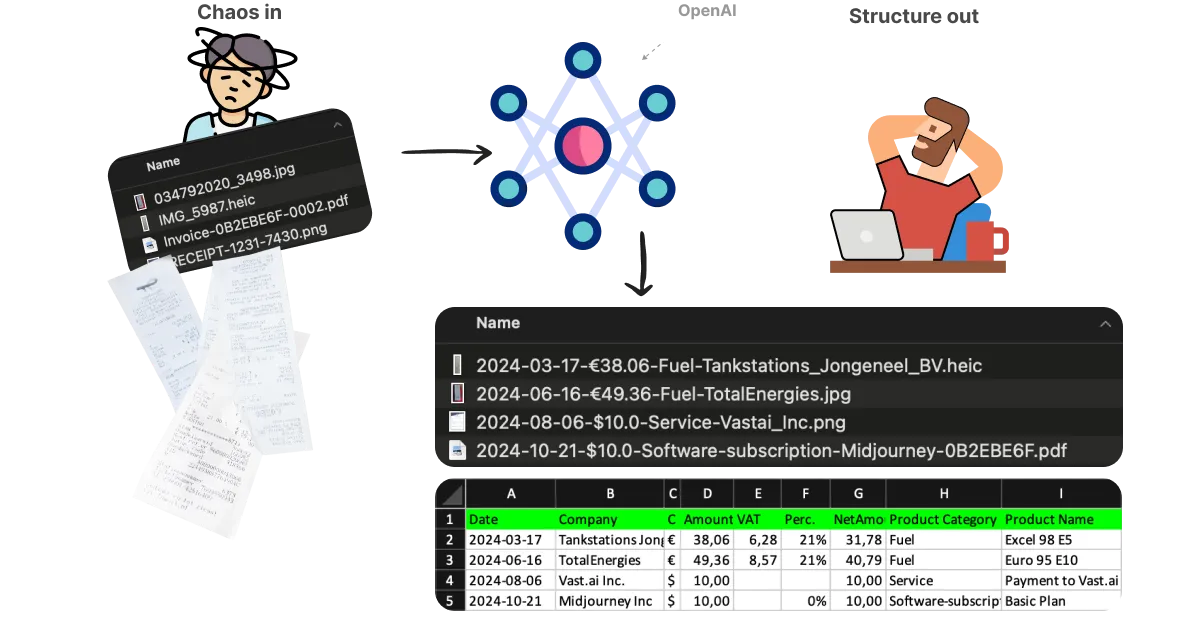
ScanRelief is an AI-powered tool that focuses on simplifying receipt and invoice processing by converting receipt files into an Excel sheet
ScanRelief is an AI-powered tool that focuses on simplifying receipt and invoice processing by converting receipt files into an Excel sheet and renaming the files with relevant information from the receipt, providing a detailed and organized account report. Using OpenAI, ScanRelief scans receipts in...
Overall Score
0
of AI companies
Overall Score
0
GitHub Stars
—
Monthly Visits
0
Community Rating
5.0
ScanRelief is an AI-powered tool that focuses on simplifying receipt and invoice processing by converting receipt files into an Excel sheet and renaming the files with relevant information from the receipt, providing a detailed and organized account report. Using OpenAI, ScanRelief scans receipts in...
Latest detected signals across traffic, developer activity and community mentions.
Indexed by indexator.ai
ScanRelief is an AI-powered tool that focuses on simplifying receipt and invoice processing by converting receipt files into an Excel sheet and renaming the files with relevant information from the receipt, providing a detailed and organized account report. Using OpenAI, ScanRelief scans receipts in...
Get notified when score, traffic, GitHub or community signals change.
Latest detected signals across traffic, developer activity and community mentions.
Indexed by indexator.ai
Six signals, each 0–100, blended into the overall by their listed weight.
Generated from public signals and search intent.
Each dimension is weighted (traffic 20% · community 25% · growth 15% · momentum 15% · innovation 10%) and combined into the overall.
Saves
6.2K
Rating
5.0
3 reviews
Views
12.1K
Category
Receipts
Pros · 36
Cons · 8
Rating distribution
User reviews · 1
It really does what it says
Release history · 1+
Initial release of ScanRelief.
Q&A · 22
ScanRelief is an AI-powered tool that utilizes OpenAI to simplify receipt management. It converts receipt files into Excel sheets and intelligently renames them with relevant information from the receipt. The renaming format starts with the date, followed by the amount, product type, and company name, offering chronological sorting of receipts and making them easily recognizable. By doing so, it provides a comprehensive overview, correlating receipts with bank transactions or accounting records.
ScanRelief supports various file formats, including JPEG, PNG, HEIC and PDF. This makes it versatile enough to handle diverse receipt images for effective conversion.
Yes, ScanRelief is designed to handle multiple receipts simultaneously. This feature significantly saves time and effort, making receipt management more efficient.
Yes, ScanRelief is available for both Mac and Windows users. This makes it a versatile tool that caters to a wide range of operating systems and user preferences.
No, ScanRelief does not operate on a subscription model. Instead, it operates on a pay-per-use model with OpenAI. Therefore, ScanRelief does not come with additional subscription fees, making it a cost-effective solution for receipt management.
Alternatives — peer set
AI Receipt Parsing: Simple UI for humans, REST API for robots.
Organize receipts effortlessly from your inbox.
Revolutionizing expense tracking with AI-powered receipt management.
Simple receipt management for small businesses.
Transform receipts into structured JSON effortlessly.
Turn receipts into tax deductions.
How do you feel about this company?
Your vote helps improve ranking signals.
Badge
A lightweight SVG badge showing the score.
<a href="https://indexator.ai/companies/scanrelief" target="_blank" rel="noopener">
  <img src="https://indexator.ai/api/embed/badge/scanrelief" alt="ScanRelief Score on Indexator.ai" width="200" height="60" />
</a>Score Card
An embeddable card with score breakdown.
<iframe src="https://indexator.ai/api/embed/card/scanrelief" width="300" height="200" frameborder="0" style="border:none;border-radius:8px"></iframe>Category Leaderboard
Top 10 in Receipts.
<iframe src="https://indexator.ai/api/embed/leaderboard?category=Receipts" width="300" height="400" frameborder="0" style="border:none;border-radius:8px"></iframe>