
Overall Score
19
Top 50%
of AI companies

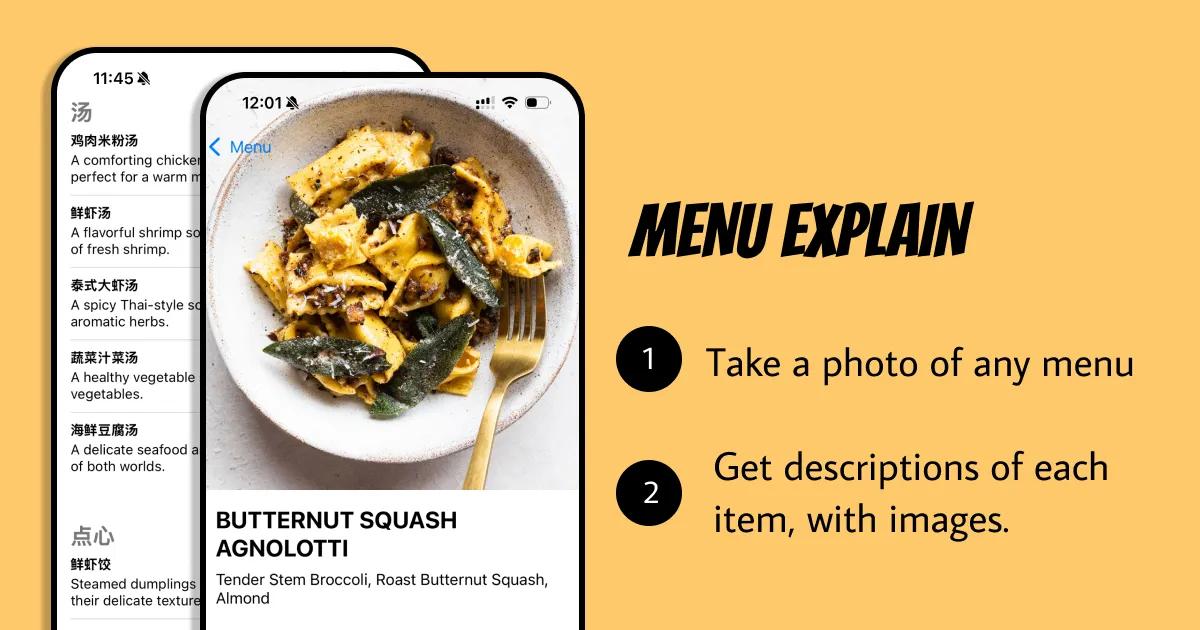
Translate & Visualize menus instantly. Take a photo of any menu, in any language and get detailed description of each item with photos.
Menu Explain is an AI-based tool designed to translate and visualize menus from any language to help users understand their contents. The app operates by having users take a photo of the menu. The artificial intelligence technology then processes the photo to provide a comprehensive breakdown of eac...
Overall Score
19
Top 50%
of AI companies
Overall Score
19
GitHub Stars
—
Monthly Visits
781
Community Rating
5.0
Menu Explain is an AI-based tool designed to translate and visualize menus from any language to help users understand their contents. The app operates by having users take a photo of the menu. The artificial intelligence technology then processes the photo to provide a comprehensive breakdown of eac...
Latest detected signals across traffic, developer activity and community mentions.
Indexed by indexator.ai
Featured on Product Hunt
| Keyword | Volume / Mo | CPC |
|---|---|---|
| quinoa salad means | — | — |
| dishoom house caat | 130 | — |
| menu translator online | 0 | — |
Menu Explain is an AI-based tool designed to translate and visualize menus from any language to help users understand their contents. The app operates by having users take a photo of the menu. The artificial intelligence technology then processes the photo to provide a comprehensive breakdown of eac...
Get notified when score, traffic, GitHub or community signals change.
Latest detected signals across traffic, developer activity and community mentions.
Indexed by indexator.ai
Featured on Product Hunt
Six signals, each 0–100, blended into the overall by their listed weight.
Generated from public signals and search intent.
Each dimension is weighted (traffic 20% · community 25% · growth 15% · momentum 15% · innovation 10%) and combined into the overall.
| Keyword | Volume / Mo | CPC |
|---|---|---|
| quinoa salad means | — | — |
| dishoom house caat | 130 | — |
| menu translator online | 0 | — |
4.5K
Rating
5.0
1 review
Views
4.5K
Category
Menu translation
Pros · 25
Cons · 10
Rating distribution
User reviews · 1
Ultimate foodie travel tool!
Release history · 1+
Initial release of Menu Explain.
Q&A · 22
Menu Explain functions by using artificial intelligence technology to translate and visualize menus. Users take a photo of the menu, which is then processed by the AI. The system then provides a comprehensive breakdown of each menu item, complete with descriptions and related images.
The primary features of Menu Explain include interactive translations, AI Image Recognition, multilingual support, a 'Scan History' feature allowing users to reference previously scanned menus, and an interface providing a breakdown of each dish with images and detailed explanations.
Yes, Menu Explain is designed to provide support for any language, making it versatile and valuable for a diverse range of users.
Indeed, Menu Explain is beneficial for travelers. With its multilingual support and instant translation of menus, it assists in navigating culinary landscapes in unfamiliar territories.
The 'Scan History' feature in Menu Explain allows users to return and reference menus they've scanned previously. This feature provides an easy way to recall past dining experiences or favorite dishes.
How do you feel about this company?
Your vote helps improve ranking signals.
Badge
A lightweight SVG badge showing the score.
<a href="https://indexator.ai/companies/menu-explain" target="_blank" rel="noopener">
  <img src="https://indexator.ai/api/embed/badge/menu-explain" alt="Menu Explain Score on Indexator.ai" width="200" height="60" />
</a>Score Card
An embeddable card with score breakdown.
<iframe src="https://indexator.ai/api/embed/card/menu-explain" width="300" height="200" frameborder="0" style="border:none;border-radius:8px"></iframe>Category Leaderboard
Top 10 in Image Generation.
<iframe src="https://indexator.ai/api/embed/leaderboard?category=Image%20Generation" width="300" height="400" frameborder="0" style="border:none;border-radius:8px"></iframe>